
How Google Classroom is used at Central Film School
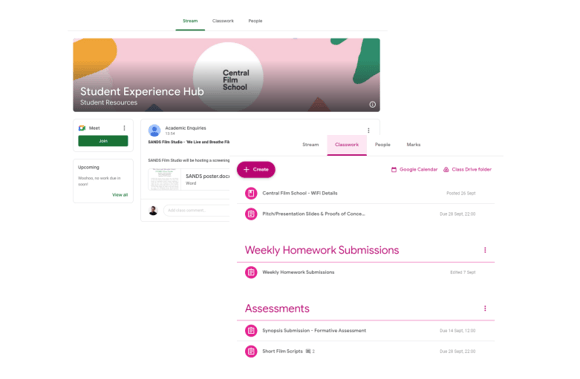
Tutors, Module Leaders, and other staff will routinely post learning material and useful information into classrooms and will use the stream to keep up to date with important notices.
The Classroom section will include your Module Guide, Assessments and Learning Materials for the term.
The stream is where your tutors will post announcements and notifications regarding the class. Your class will be able to leave comments and discuss messages left by staff.
Accepting Classroom Invitations
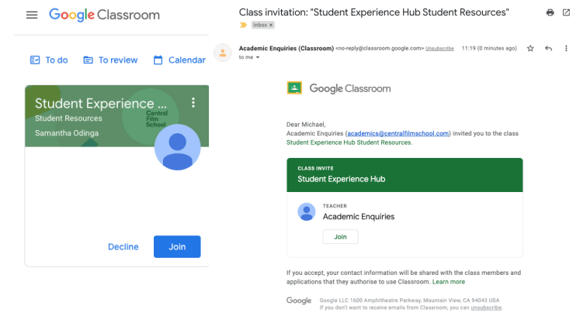
When you start a course or new term at Central Film School, you will be invited to the Google Classrooms for your modules. You will also be invited to any relevant classrooms that include useful information and guidance to get the most out of your studies with us.
Invites to classrooms will be sent directly to your CFS email account, and can be joined directly from within the email. You can also join via the Google Classroom homepage.
Uploading your Assessments
Your assessment briefs will also be added to the Google Classroom as assignments. There will include the instructions for the assessment as well as acting as the submission box.
The assessment brief and module guide will include the format required for each
assessment.
Please make sure that you give yourself plenty of time to submit your assessments before
the deadline as you may encounter some issues when attempting to upload your work.
If you have any issues, please contact qar@centralfilmschool.com and clearly state
the problem you are experiencing and provide screenshots where possible.
Please note that we accept late submissions, however, these will be capped at the passing
grade (40% for undergraduate and 50% for postgraduate).